
Finding out that a critical part in your design has been discontinued is a major hurdle for any engineering team. If this happens during a production run, it can lead to assembly line shutdowns, expensive re-designs, and missed market opportunities. In the electronics industry, this challenge is known as component obsolescence.
PCB component obsolescence management is the process of tracking the availability of every part in a bill of materials (BOM) to ensure a product can be manufactured for its intended lifespan. When a manufacturer stops producing a part, that part is considered “obsolete.”
Maintaining a product’s longevity requires a shift from reactive fixes to a proactive strategy. By understanding the lifecycle of your parts and having a plan for when they disappear, you protect your project’s timeline and budget. This guide covers the basics of managing these risks through careful planning and data-driven tools.
The Role of PCB Component Obsolescence Management
The impact of poor PCB component obsolescence management is felt in three main ways:
- Cost: Re-spinning a board to accommodate a new part requires engineering hours, new prototypes, and updated testing.
- Supply Chain Stability: A single missing 50-cent capacitor can prevent the shipment of a ten-thousand-dollar system.
- Product Lifecycle: For industrial or medical products meant to last 10–15 years, managing parts is a constant requirement, not a one-time task.
Successful management means identifying “at-risk” parts during the design phase rather than during procurement.
Proactive Strategies for Lifecycle Tracking
To stay ahead of part shortages, engineers use several key tactics to monitor their BOM. The goal is to identify components nearing their “End of Life” (EOL) or marked as “Not Recommended for New Designs” (NRFND).
Understanding Lifecycle Stages
Most manufacturers follow a standard set of stages to describe part availability, though not every supplier publishes them formally. Active components, especially ICs and specialized parts, often move through a lifecycle that can include status changes such as Not Recommended For New Designs (NRFND), Last Time Buy (LTB), and End of Life (EOL), while simpler passive components may remain in production for many years with fewer formal warnings. Knowing where your component sits on this scale is the first step in risk mitigation.
| Lifecycle Stage | Description | Action Required |
| Active | The part is in full production and widely available. | Safe for use in new designs. |
| Not Recommended For New Designs (NRFND) | The part is still produced, but not suggested for new projects. | Look for a successor part immediately. |
| Last Time Buy (LTB) | The manufacturer announces the final date to order the part. | Calculate total future needs and stock up. |
| End of Life (EOL) | Production has stopped; stock is limited to what exists. | Immediate re-design or find a functional equivalent. |
Alternative Sourcing and FFF Replacements
When a part becomes hard to find, engineers look for alternatives that meet the “Form, Fit, and Function” (FFF) criteria. These are parts from different manufacturers that are interchangeable in key ways, helping reduce supply chain risk and avoid redesigns.
- Form refers to the physical package and footprint of the component
- Example: A 0603 resistor from one manufacturer can be replaced with another 0603 resistor as long as the pad layout matches
- Fit refers to mechanical and placement compatibility on the PCB
- Example: An SOIC-8 package from different vendors must align correctly with the same pad spacing and board footprint
- Function refers to electrical behavior and performance specifications
- Example: A 3.3V LDO regulator from two different suppliers must deliver the same output voltage, current rating, and stability characteristics
Having a secondary source already validated in your design documentation can save weeks of disruption if your primary supplier becomes unavailable.
Tools like UL’s Multi-Vendor Cross-Referencing feature help automate this process by mapping equivalent parts across multiple manufacturers, making it easier to identify and qualify drop-in replacements early in the design phase.
Using Digital Tools to Mitigate Risk
Manually checking the status of hundreds of parts across multiple manufacturer websites is a recipe for error. Modern design requires integrated databases that provide real-time updates on component status.
Digital tools like Ultra Librarian help engineers manage obsolescence by providing:
- Real-Time Status Alerts: Access to data that flags EOL or NRFND parts as you select them.
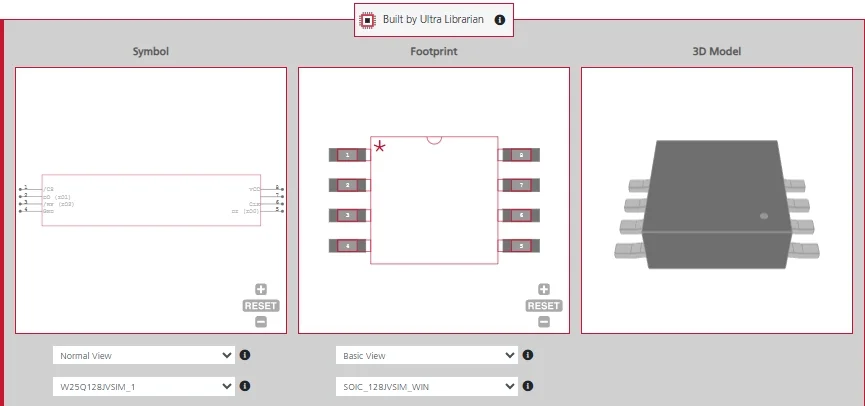
- Verified CAD Models: If you must switch to an alternative part, having a verified schematic symbol, PCB footprint, and 3D model ensures the new part will actually fit the existing board layout.
- Multi-Vendor Cross-Referencing: Databases often suggest similar parts from other manufacturers, making it easier to find those FFF replacements.
By using these databases early, you can filter out risky components before they are ever placed on a schematic, ensuring your design is built on a stable foundation of available hardware.
Managing the lifespan of your PCB is about more than just good circuit design; it is about supply chain intelligence. By incorporating PCB component obsolescence management into your standard workflow, you reduce the risk of forced re-designs and keep your production lines moving.
If you are looking for verified CAD models and real-time data for your BOM, Ultra Librarian helps by compiling all your sourcing and CAD information for popular ECAD applications in one place. Our platform provides footprints and symbols for millions of parts, helping you find alternatives and keep your designs viable for the long term.
Working with Ultra Librarian sets your team up for success, ensuring streamlined and error-free design, production, and sourcing. Register today for free.

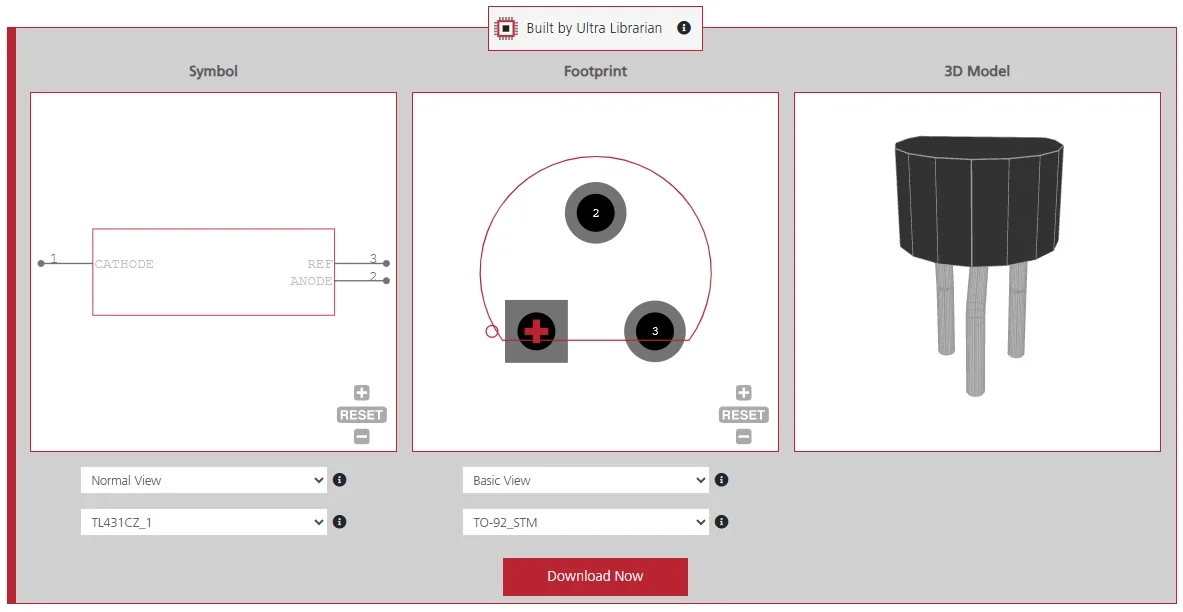
 If you’re looking for any of our component footprints or models, we have readily available and free options for you and your design team. Search our library for the solution you’ve been looking for.