
An active and well-stocked component at the time of design can reach end-of-life status before the product it was designed into ever reaches full production volume. For Printed Circuit Board (PCB) designers working across multi-year development programs, component lifecycle management is the bridge between a finished schematic and a manufacturable product. Without such management, Bill of Materials (BOM) stability depends on luck rather than process, and supply chain disruptions surface at the worst possible point in the product timeline.
This guide covers the critical lifecycle stages engineers must navigate, how to monitor changes in part status before they impact production, and how to embed lifecycle checks directly into Computer-Aided Design (CAD) library management, BOM workflows, and design reviews. Ultimately, addressing obsolescence risk during the design phase prevents discovery after fabrication.
What Component Lifecycle Management Covers
Component lifecycle management is the practice of tracking a part’s status from initial release through discontinuation and using the data to make informed decisions at every stage of the design and production workflow. For PCB designers, the practical scope covers three distinct areas:
- Understanding where a part sits in its lifecycle at the time of specification
- Continuously monitoring the status throughout development and production
- Maintaining verified alternatives to substitute if the primary part becomes unavailable
The goal is to keep the BOM buildable throughout the entire product production window, which spans 5 to 10 years or longer for many industrial and commercial designs. An active component today may move through multiple lifecycle stages within the window, and each transition carries a different risk profile for the hardware design depending on the specific component.
Component Lifecycle Stages Every PCB Designer Should Know
Manufacturers classify parts through a defined set of lifecycle stages, though the exact terminology varies by manufacturer. The table below maps each lifecycle stage to its production implication and the recommended design action at each point.
Component Lifecycle Stages
| Lifecycle Stage | What It Means | Recommended Action |
| Active | Part is in full production and available through standard channels | Safe to specify in new designs |
| Mature | Part remains available but is no longer being promoted for new designs | Monitor for transition to NRND or EOL |
| Not Recommended for New Designs (NRND) | Manufacturer advises against specifying in new designs | Identify and qualify an alternate immediately |
| End of Life (EOL) | Manufacturer has announced discontinuation with a last-time buy date | Initiate last-time buy or transition to alternate |
| Discontinued | Part is no longer manufactured or stocked by the original manufacturer | Alternate required, verify second-source availability |
| Obsolete | Part has no remaining stock through authorized channels | Design revision required if no qualified alternate exists |
Understanding where a specific component sits in the lifecycle progression at the time of specification is the first step. In practice, many engineers select parts at the active stage without checking whether the active part is approaching the Not Recommended for New Designs (NRND) status, thereby significantly compressing the available response window.
How to Monitor Part Status Changes
A proactive monitoring process helps engineering teams identify component changes early and respond before they disrupt procurement or production.
Product Change Notices and End-of-Life Announcements
Manufacturers issue Product Change Notices (PCNs) when they intend to modify or discontinue a component. A PCN may announce:
- A packaging change
- A die revision
- A test specification update
- An EOL timeline
For PCB designers, the most consequential PCNs are those affecting physical dimensions, electrical parameters, or availability, since any such changes can impact form, fit, or function in the target design.
Monitoring PCNs manually across a large BOM is not practical for most engineering teams. In response, many component distributors and CAD library platforms provide automated PCN notification services to flag status changes for parts on a tracked list. Integrating such services into the design workflow means engineers receive EOL and NRND notifications before the change affects production rather than discovering the issue during a reorder.
Distributor Stock and Lead Time Signals
Distributor stock levels and lead time data carry early warning signals often preceding formal EOL announcements. When authorized distributor stock for a specific part consistently declines across multiple quarters while lead times lengthen, the pattern often indicates the manufacturer has reduced production ahead of a formal discontinuation notice. Tracking such supply signals alongside formal PCN data gives engineers earlier visibility into parts approaching lifecycle risk.
For PCB designers who reference component sourcing data during the design process, integrating distributor availability checks into the part selection workflow adds a layer of lifecycle screening not provided by datasheet review alone.
Lifecycle Status in CAD Libraries
A CAD library containing only schematic symbols, footprints, and 3D models, without lifecycle status data, forces engineers to perform lifecycle checks separately from the component selection step. Embedding lifecycle status directly in the library record changes that:
- The engineer sees the part’s current status at the point of selection
- Status issues surface immediately, rather than being discovered later during a downstream BOM audit
Ultra Librarian’s component library provides access to verified symbols, footprints, and 3D models, along with sourcing and availability data, allowing engineers to cross-reference lifecycle status and distributor stock at the same step where they download CAD data. Such direct integration reduces the gap between component selection and lifecycle screening without adding a separate process step to the design workflow.
Using Alternates and Second Sources to Protect BOM Stability
Establishing qualified alternates and second sources reduces dependence on a single component and helps protect BOM stability when availability, pricing, or lifecycle status changes.
Qualifying Alternates During the Design Phase
One effective point to qualify a component alternate is during the design phase, before the primary part has been committed to a production BOM. At this stage, the engineering team has full control over:
- The footprint
- The schematic symbol
- The electrical parameters the alternate must match
Qualifying an alternate after a primary part goes EOL introduces schedule risk because the alternate must be evaluated and tested, and may require a footprint revision before it can be substituted.
A practical approach is to identify at least one qualified alternate for every BOM part lacking a direct second source from another manufacturer:
- Commodity components (resistors, capacitors, standard logic): Second sources are typically available for qualification.
- Specialized parts (proprietary ICs, power management devices, application-specific sensors): The alternate qualification process requires more thorough electrical and mechanical verification.
Second-Source Availability as a Design Criterion
Second-source availability is worth treating as a design criterion alongside electrical performance and cost. A part with two or three qualified manufacturers carries significantly lower obsolescence risk than a single-source component, even if both components are currently active. In a supply chain disruption, a multi-source part gives the procurement team options a single-source part does not offer.
When evaluating second sources, the key parameters to verify are:
- Package compatibility: The alternate must use the same land pattern as the primary part; otherwise, a footprint revision is required.
- Electrical parameter overlap: Key specifications such as voltage range, current rating, timing parameters, and interface protocol must fall within the design’s operating margins.
- Qualification status: For automotive, medical, or industrial designs, the alternate must carry the same certification as the primary part. An AEC-Q100-qualified alternate cannot be replaced with a commercial-grade part without requalification.
- Distributor coverage: The alternative should be available through at least two authorized distributors to avoid replicating the single-source risk at the distribution level.
Integrating Component Lifecycle Management Into the Design Process
Embedding component lifecycle management into the design process helps teams identify supply and obsolescence risks before they affect the BOM or delay production.
Lifecycle Checks in CAD Library Management
The CAD library is the earliest point in the design process where component lifecycle management can be applied. Engineers who download PCB footprints and component data from a governed library with embedded lifecycle status perform a lifecycle check as part of normal part selection, rather than as a separate audit step.
Library governance flagging NRND and EOL parts at the point of use reduces the likelihood of a part approaching discontinuation entering a new design. Such governance also provides a mechanism to retire obsolete parts from the library, so they are not available for selection in future designs.
BOM Audits and Design Reviews
A BOM-level lifecycle audit at each formal design review milestone catches lifecycle risks before they reach the fabrication or production stage.
- At the schematic review, a lifecycle check confirms no parts have transitioned to NRND or EOL status since they were specified.
- At the pre-production BOM review, distributor stock levels and lead times are verified against the production schedule to confirm all parts will be available in the required quantities when production begins.
For teams managing multiple active designs simultaneously, a periodic BOM audit across all active projects provides visibility into lifecycle risks otherwise hidden until a specific project reaches production. Such a review is more efficient than discovering lifecycle problems one project at a time during individual design reviews.
Managing PCNs Through Production
Component lifecycle management does not end when a design goes into production. Active parts at the start of a product’s production life may reach NRND or EOL status during the production window. A standard production-phase component management program includes:
- Receiving and reviewing PCNs during production
- Evaluating the impact of each change on the affected design
- Initiating alternate qualification or last-time buys when necessary
For designs with long production windows, such as industrial equipment or medical devices with multi-year service requirements, it’s worth scheduling an annual BOM lifecycle review. This practice keeps the engineering team ahead of discontinuation timelines rather than reacting to them.
Protect Your Designs With Component Lifecycle Management
Component lifecycle management, applied consistently throughout the design and production process, reduces the frequency and severity of obsolescence-driven disruptions. Lifecycle checks at the library level, BOM audits at design reviews, PCN monitoring during production, and qualified alternates for single-source parts each address a different point in the obsolescence risk timeline. Together, they give engineering teams the visibility to make sourcing decisions proactively rather than reactively.
If you’re looking for CAD models for common components or for component lifecycle management tools integrating sourcing and availability data into your design workflow, Ultra Librarian helps by compiling all your sourcing and CAD information in one place.
Working with Ultra Librarian sets your team up for success by ensuring streamlined, error-free design, production, and sourcing. Register today for free.

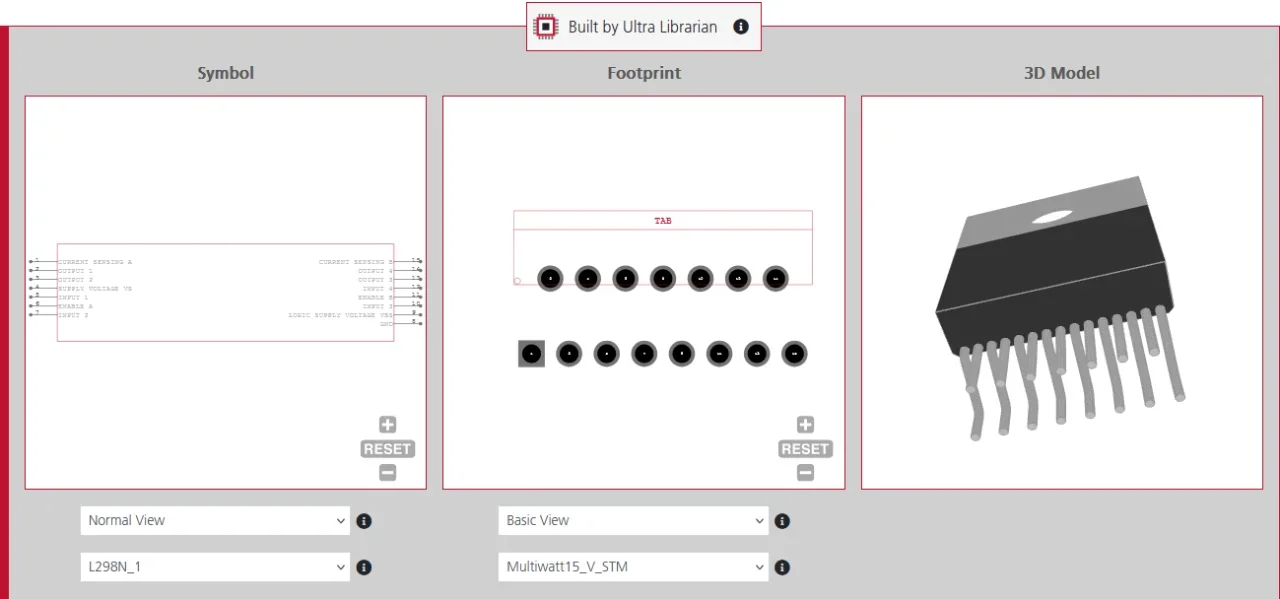

 If you’re looking for any of our component footprints or models, we have readily available and free options for you and your design team. Search our library for the solution you’ve been looking for.